AppSnap AppSnap
Idioma
VibeSync: Haptic Rhythm

VibeSync: Haptic Rhythm

Innowave Studio LLC Music 5.0 (11) 2 extracciones

Capturas de Pantalla

iPhone Capturas de Pantalla (67)

iPhone 截图 1
Capturas de Pantalla 1
iPhone 截图 2
Capturas de Pantalla 2
iPhone 截图 3
Capturas de Pantalla 3
iPhone 截图 4
Capturas de Pantalla 4
iPhone 截图 5
Capturas de Pantalla 5
iPhone 截图 6
Capturas de Pantalla 6
iPhone 截图 7
Capturas de Pantalla 7
iPhone 截图 8
Capturas de Pantalla 8
iPhone 截图 9
Capturas de Pantalla 9
iPhone 截图 10
Capturas de Pantalla 10
iPhone 截图 11
Capturas de Pantalla 11
iPhone 截图 12
Capturas de Pantalla 12
iPhone 截图 13
Capturas de Pantalla 13
iPhone 截图 14
Capturas de Pantalla 14
iPhone 截图 15
Capturas de Pantalla 15
iPhone 截图 16
Capturas de Pantalla 16
iPhone 截图 17
Capturas de Pantalla 17
iPhone 截图 18
Capturas de Pantalla 18
iPhone 截图 19
Capturas de Pantalla 19
iPhone 截图 20
Capturas de Pantalla 20
iPhone 截图 21
Capturas de Pantalla 21
iPhone 截图 22
Capturas de Pantalla 22
iPhone 截图 23
Capturas de Pantalla 23
iPhone 截图 24
Capturas de Pantalla 24
iPhone 截图 25
Capturas de Pantalla 25
iPhone 截图 26
Capturas de Pantalla 26
iPhone 截图 27
Capturas de Pantalla 27
iPhone 截图 28
Capturas de Pantalla 28
iPhone 截图 29
Capturas de Pantalla 29
iPhone 截图 30
Capturas de Pantalla 30
iPhone 截图 31
Capturas de Pantalla 31
iPhone 截图 32
Capturas de Pantalla 32
iPhone 截图 33
Capturas de Pantalla 33
iPhone 截图 34
Capturas de Pantalla 34
iPhone 截图 35
Capturas de Pantalla 35
iPhone 截图 36
Capturas de Pantalla 36
iPhone 截图 37
Capturas de Pantalla 37
iPhone 截图 38
Capturas de Pantalla 38
iPhone 截图 39
Capturas de Pantalla 39
iPhone 截图 40
Capturas de Pantalla 40
iPhone 截图 41
Capturas de Pantalla 41
iPhone 截图 42
Capturas de Pantalla 42
iPhone 截图 43
Capturas de Pantalla 43
iPhone 截图 44
Capturas de Pantalla 44
iPhone 截图 45
Capturas de Pantalla 45
iPhone 截图 46
Capturas de Pantalla 46
iPhone 截图 47
Capturas de Pantalla 47
iPhone 截图 48
Capturas de Pantalla 48
iPhone 截图 49
Capturas de Pantalla 49
iPhone 截图 50
Capturas de Pantalla 50
iPhone 截图 51
Capturas de Pantalla 51
iPhone 截图 52
Capturas de Pantalla 52
iPhone 截图 53
Capturas de Pantalla 53
iPhone 截图 54
Capturas de Pantalla 54
iPhone 截图 55
Capturas de Pantalla 55
iPhone 截图 56
Capturas de Pantalla 56
iPhone 截图 57
Capturas de Pantalla 57
iPhone 截图 58
Capturas de Pantalla 58
iPhone 截图 59
Capturas de Pantalla 59
iPhone 截图 60
Capturas de Pantalla 60
iPhone 截图 61
Capturas de Pantalla 61
iPhone 截图 62
Capturas de Pantalla 62
iPhone 截图 63
Capturas de Pantalla 63
iPhone 截图 64
Capturas de Pantalla 64
iPhone 截图 65
Capturas de Pantalla 65
iPhone 截图 66
Capturas de Pantalla 66
iPhone 截图 67
Capturas de Pantalla 67

Descripción de la Aplicación

Descripción de la Aplicación

2332 caracteres

Feel the Music, Beyond Hearing.

VibeSync transforms your Apple Music listening experience into a breathtaking tactile journey. By syncing high-definition haptic patterns with your favorite tracks, we bring a "physical" dimension to digital music. Whether it's the punchy bass of an EDM track or the delicate rhythm of a lo-fi beat, you won't just hear the music—you'll feel it.

【CORE FEATURES】

Real-time Haptic Sync: Seamlessly integrates with Apple Music to trigger precision-engineered vibration scripts that match the beat perfectly.

Pro-Level Script Library: Access a curated collection of 80+ handcrafted haptic "scores" for global hits, designed to maximize your device's Taptic Engine.

Smart Recognition: Automatically detects your currently playing song and loads the corresponding tactile experience.

Immersive UI: A dynamic, music-responsive interface that visualizes the vibe while you feel the rhythm.

【APPLE WATCH: THE VIBE ON YOUR WRIST】
Don't just feel the rhythm on your phone—sync it to your Apple Watch!

Wrist Haptics: Experience high-fidelity tactile feedback directly through your Watch's Taptic Engine.

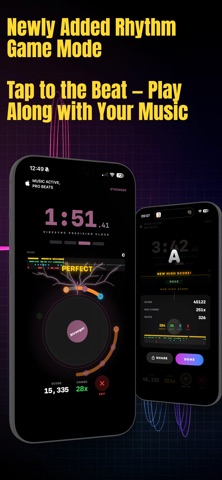
VibeSync now has Game Mode.

Tap along with the beat, build combos, chase high scores, and turn your favorite songs into a playable rhythm challenge. This update also adds:
• A new 3-2-1-GO countdown for cleaner game starts
• Live score, combo, and grade tracking while you play
• A detailed results screen with timing breakdowns
• Shareable score cards to show off your best runs
• High score sync across devices
• A first-time Game Mode tutorial to get you started fast

【HOW IT WORKS】

Launch VibeSync—choose song from the library, the app automatically direct you to apple music to play the song, then switch back to VibeSync

Hold your device and feel the custom-designed haptic vibrations pulse in perfect harmony with the audio.

【PRO SUBSCRIPTION】

Upgrade to VibeSync Pro to unlock our full library of premium haptic scripts and exclusive early access to new beat patterns added weekly.

Note: VibeSync requires an active Apple Music subscription and a device with haptic feedback support.

Terms of Use (EULA): https://www.apple.com/legal/internet-services/itunes/dev/stdeula/
Privacy Policy: https://lumpy-petroleum-223.notion.site/VibeSync-Privacy-Policy-34e0c2e3e3cd8087ad1cc8860f83ed09

Descripción de la Aplicación

Notas de Lanzamiento

284 caracteres

• Added premium disk themes for a more personalized VibeSync look
• Added new Pro songs to the library, including fresh pop favorites and upbeat throwbacks
• Improved song discovery with the latest tracks highlighted in New
• Updated the Pro experience with refreshed premium previews

Notas de Lanzamiento

Información Completa de la Aplicación (Formato JSON)

Información Completa de la Aplicación (Formato JSON)
Información Completa de la Aplicación (Formato JSON)