





AppSnap AppSnap
Langue
Calflow 自动化时间记录--同步苹果日历统计、时间追踪

Calflow 自动化时间记录--同步苹果日历统计、时间追踪

Kyovan Ltd. Productivity 4.9 (2,427)

Captures d'Écran

iPhone Captures d'Écran (78)

iPhone 截图 1
Captures d'Écran 1
iPhone 截图 2
Captures d'Écran 2
iPhone 截图 3
Captures d'Écran 3
iPhone 截图 4
Captures d'Écran 4
iPhone 截图 5
Captures d'Écran 5
iPhone 截图 6
Captures d'Écran 6
iPhone 截图 7
Captures d'Écran 7
iPhone 截图 8
Captures d'Écran 8
iPhone 截图 9
Captures d'Écran 9
iPhone 截图 10
Captures d'Écran 10
iPhone 截图 11
Captures d'Écran 11
iPhone 截图 12
Captures d'Écran 12
iPhone 截图 13
Captures d'Écran 13
iPhone 截图 14
Captures d'Écran 14
iPhone 截图 15
Captures d'Écran 15
iPhone 截图 16
Captures d'Écran 16
iPhone 截图 17
Captures d'Écran 17
iPhone 截图 18
Captures d'Écran 18
iPhone 截图 19
Captures d'Écran 19
iPhone 截图 20
Captures d'Écran 20
iPhone 截图 21
Captures d'Écran 21
iPhone 截图 22
Captures d'Écran 22
iPhone 截图 23
Captures d'Écran 23
iPhone 截图 24
Captures d'Écran 24
iPhone 截图 25
Captures d'Écran 25
iPhone 截图 26
Captures d'Écran 26
iPhone 截图 27
Captures d'Écran 27
iPhone 截图 28
Captures d'Écran 28
iPhone 截图 29
Captures d'Écran 29
iPhone 截图 30
Captures d'Écran 30
iPhone 截图 31
Captures d'Écran 31
iPhone 截图 32
Captures d'Écran 32
iPhone 截图 33
Captures d'Écran 33
iPhone 截图 34
Captures d'Écran 34
iPhone 截图 35
Captures d'Écran 35
iPhone 截图 36
Captures d'Écran 36
iPhone 截图 37
Captures d'Écran 37
iPhone 截图 38
Captures d'Écran 38
iPhone 截图 39
Captures d'Écran 39
iPhone 截图 40
Captures d'Écran 40
iPhone 截图 41
Captures d'Écran 41
iPhone 截图 42
Captures d'Écran 42
iPhone 截图 43
Captures d'Écran 43
iPhone 截图 44
Captures d'Écran 44
iPhone 截图 45
Captures d'Écran 45
iPhone 截图 46
Captures d'Écran 46
iPhone 截图 47
Captures d'Écran 47
iPhone 截图 48
Captures d'Écran 48
iPhone 截图 49
Captures d'Écran 49
iPhone 截图 50
Captures d'Écran 50
iPhone 截图 51
Captures d'Écran 51
iPhone 截图 52
Captures d'Écran 52
iPhone 截图 53
Captures d'Écran 53
iPhone 截图 54
Captures d'Écran 54
iPhone 截图 55
Captures d'Écran 55
iPhone 截图 56
Captures d'Écran 56
iPhone 截图 57
Captures d'Écran 57
iPhone 截图 58
Captures d'Écran 58
iPhone 截图 59
Captures d'Écran 59
iPhone 截图 60
Captures d'Écran 60
iPhone 截图 61
Captures d'Écran 61
iPhone 截图 62
Captures d'Écran 62
iPhone 截图 63
Captures d'Écran 63
iPhone 截图 64
Captures d'Écran 64
iPhone 截图 65
Captures d'Écran 65
iPhone 截图 66
Captures d'Écran 66
iPhone 截图 67
Captures d'Écran 67
iPhone 截图 68
Captures d'Écran 68
iPhone 截图 69
Captures d'Écran 69
iPhone 截图 70
Captures d'Écran 70
iPhone 截图 71
Captures d'Écran 71
iPhone 截图 72
Captures d'Écran 72
iPhone 截图 73
Captures d'Écran 73
iPhone 截图 74
Captures d'Écran 74
iPhone 截图 75
Captures d'Écran 75
iPhone 截图 76
Captures d'Écran 76
iPhone 截图 77
Captures d'Écran 77
iPhone 截图 78
Captures d'Écran 78

Mac Captures d'Écran (6)

Mac 截图 1
Captures d'Écran 1
Mac 截图 2
Captures d'Écran 2
Mac 截图 3
Captures d'Écran 3
Mac 截图 4
Captures d'Écran 4
Mac 截图 5
Captures d'Écran 5
Mac 截图 6
Captures d'Écran 6

Apple Watch Captures d'Écran (5)

Apple Watch 截图 1
Captures d'Écran 1
Apple Watch 截图 2
Captures d'Écran 2
Apple Watch 截图 3
Captures d'Écran 3
Apple Watch 截图 4
Captures d'Écran 4
Apple Watch 截图 5
Captures d'Écran 5

Description de l'Application

Description de l'Application

654 caractères

如果你正在使用苹果提醒事项和 iOS 日历/Google 日历,并想知道你如何分配时间,那么这款工具很适合你。

Calflow是一款建基于iOS日历、提醒事项,并结合时间、目标与习惯追踪的时间管理工具。

日、周计划
◆ 与 iOS 提醒事项和日历双向同步(免费)
◆ 使用「模式」分隔个人与工作任务,帮助你快速掌握行程,并保持专注

时间追踪
◆ 对你的提醒事项、日历动中计时:
- 提醒事项:会自动将时间记录同步苹果日历中
- 日历日程条目:会按实际时间在苹果日历自动更新

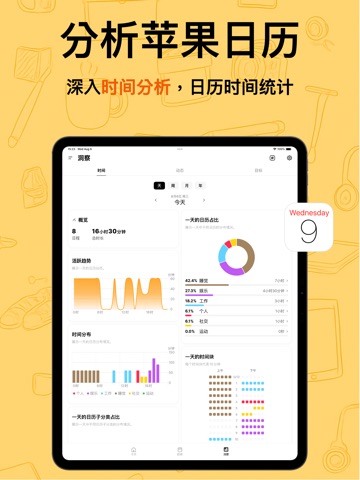
统计苹果日历
◆ 追踪你在日/周/月/年维度上的时间分布

强大的标签系统
◆ 创建自动化标签,可自动筛选日历数据,并了解它们在日/周/月/年的活动分布
◆ 创建分组,以从多角度分析你的时间分配

目标与习惯追踪
◆ 追踪你在 iOS 提醒事项、日历上的目标与习惯,确保你的计划、时间与目标保持一致

追踪任何活动的耗時,并同步至 iOS 日历
◆ Apple 健康数据同步(正念时间、睡眠时间、运动时间)
◆ App 使用时间自动化追踪(快捷指令)
◆ 日常活动(小组件)

需要帮助,或有想法想分享吗?欢迎随时联系我们:
[email protected]

服务条款(EULA): https://www.apple.com/legal/internet-services/itunes/dev/stdeula/
隐私协议: https://calflow.app/privacypolicy/

Description de l'Application

Notes de Version

460 caractères

重要的修复与优化
- 修复英文输入没有自动纠正的问题
- 修复颜色选择页面显示不完整的问题
- 修复自定义颜色无法保存的问题
- 优化小组件上图标与 emoji 在透明模式下的显示效果,减少文字模糊的情况
- 修复睡眠跨天数据在月视图中可能被归到错误日期的问题
- 修复浮动键盘可能影响新增事项输入的问题
- 优化即将页面跨天日程的时间显示:开始日与结束日会显示时间,中间日期不再重复显示时间
- 优化快捷计时小组件的快捷指令,选择时支持分组
- 修复跨天、跨月日程在洞察页面可能显示异常的问题
- 修复偶发的洞察页面崩溃的问题

最近更新亮点
Calflow 正式登陆 Mac 啦!

新功能:
1. Mac 平台
2. Mac 小组件 (如果小组件卡住了,试试重启电脑)
3. 今天页面:终于能翻阅昨天、明天等,切换其他日子啦~

非常感谢大家热心回馈 bug!
我们还在准备更多优化与惊喜内容中,下次见!
希望这次的更新能让你的一天更顺心! 有任何问题,欢迎随时与我们联络:
[email protected]

Notes de Version

Informations Complètes de l'Application (Format JSON)

Informations Complètes de l'Application (Format JSON)

Informations Complètes de l'Application (Format JSON)