


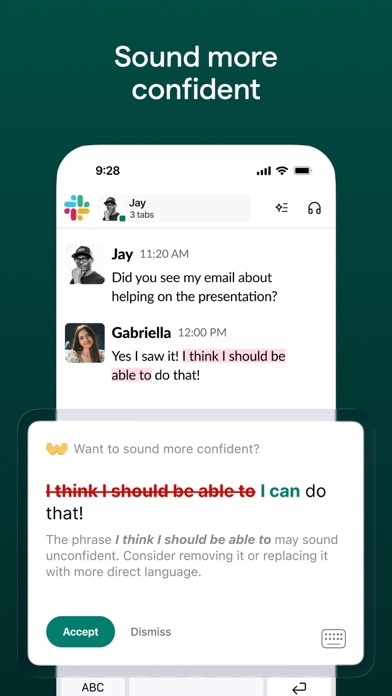


Instantly and easily create smart, polished writing with the Grammarly Keyboard. Designed to deliver real-time writing feedback and provide AI assistance, the Grammarly Keyboard works directly in your iPhone and iPad apps, no copy and paste required.
When you join the millions of people using the Grammarly Keyboard, you'll benefit from:
An easy-to-use AI keyboard that works in all your apps
- Spelling, grammar, and conciseness suggestions in 20+ languages
- Typing in 6 languages
- Voice dictation with automatic cleanup
- Vocabulary and clarity recommendations (Premium only)
- Tone detection
- Tone transformations (Premium only)
- Multi-word text predictions
- Smart autocorrect, synonyms, and swipe typing
- Emoji predictions and search bar
Generative AI rewrites
- New versions of your entire message in a couple of taps
- Versions adjust for length, fluency, tone, and more
- Rewrites are supported in 20+ languages
- Works in all your favorite apps
Voice dictation finally done right
- Fast and accurate, perfect for polished replies on the go
- Automatically removes filler words and fixes grammar
- Keep your tone intact
- Works with a broad range of languages, accents, and speaking paces
- Allows for further editing and refinement
- Audio is never stored—it’s gone the moment you’re done
A document editor for long-form writing and notes
- Comprehensive writing feedback
- Cloud-based document management
- Personal writing statistics
- Plagiarism and AI detection
- Compatible with hardware keyboards
Further improve your writing with Grammarly Premium
Grammarly Premium makes your writing more engaging and effective with advanced suggestions for clarity, conciseness, tone, and vocabulary. Premium works across all your devices.
If you upgrade to a Premium subscription, payments will be charged to the account associated with your Apple ID. Your subscription will automatically renew unless you cancel at least 24 hours before the end of the current period. After purchase, you can manage your subscription by going to your account settings in the App Store.
Privacy is our priority
Grammarly practices privacy by design. Your words are your own; we will never rent or sell your data.
User Trust Guidelines: https://www.grammarly.com/trust
Terms of Service: https://www.grammarly.com/terms
Privacy Policy: https://www.grammarly.com/privacy-policy
California Privacy Notice: https://www.grammarly.com/privacy-policy#for-california-users
Grammarly is ready for iPhone Duo, with an adopted app and keyboard for the new iPhone, along with a new split-keyboard mode. Moreover, it is now possible to enable the split layout on all iPhone models when the keyboard is opened in landscape mode.
More improvements are on the way in this release:
• Resolved a major set of text corruptions affecting synonyms, completions, and swipe alternatives.
• Speech-to-text now transcribes your speech much faster.
• Improved one-handed mode with a few extra touches.
• Fixed various issues occurring during sign-in with Google.
• Removed the automatic blur effect on iOS 27 in the proofreader and emoji catalog.
• Fixed issues with text replacements containing punctuation.
• Resolved an issue with a key pop-up flickering during typing.
• Fixed a crash in the editor that could happen when the app is in the background.
• Fixed the speech-to-text button on iPad in hardware keyboard mode.
As always, thank you for using Grammarly!
전체 앱 정보 (JSON 형식)
전체 앱 정보 (JSON 형식)


